How to Use a Garage Door Keypad: Quick Guide
Picture this: you’re arriving home with arms full of groceries, it’s pouring rain, and you realize your house keys are buried at the bottom of your bag. Instead of fumbling in the downpour, you simply tap a four-digit code on a small keypad by your garage door, and voilà—it opens automatically. This everyday convenience is exactly why garage door keypads have become essential home accessories, saving thousands from frustrating lockouts each year.
A garage door keypad transforms your daily routine by providing secure, keyless entry to your garage without carrying remotes or house keys. Whether you’re dealing with a wireless model, hardwired system, or modern smart keypad, mastering these devices is simpler than you might think. This comprehensive guide walks you through everything from initial setup to advanced features, ensuring you’ll never be locked out again—no technical expertise required.
Program Your First PIN Code in Under 5 Minutes
Locate Your Opener’s Learn Button Correctly
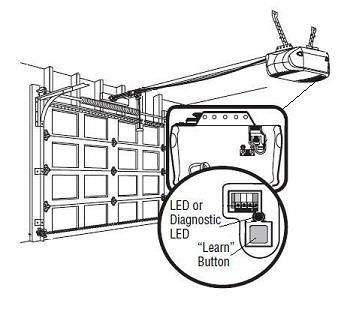
Start by finding the “Learn” or “Smart” button on your garage door opener motor unit—it’s typically a small, colored button on the back or side of the housing. This button is your gateway to programming any keypad, regardless of brand. The color actually matters: red/orange indicates 390 MHz frequency, purple means 315 MHz, and yellow signifies Security+ 2.0 systems. For hardwired keypads, verify your low-voltage wiring is properly connected to the 24V terminal on the opener before proceeding.
Standard Programming Steps for All Major Brands
- Press and release the Learn button—the indicator light will illuminate for 30 seconds
- Enter your desired 4-digit PIN on the keypad within this 30-second window
- Press and hold ENTER until the garage door opener light blinks
- Release ENTER immediately when blinking starts
- Test immediately by entering your PIN and pressing ENTER
If your opener doesn’t respond, check for LED interference from modern energy-efficient bulbs—switch back to incandescent if problems persist after reprogramming.
Brand-Specific Programming Variations You Must Know
Chamberlain/LiftMaster/Craftsman users: After pressing the Learn button, enter your PIN, then press and release the 0 button three times before pressing ENTER.
Genie Intellicode systems: Hold the PROGRAM button until LED turns blue, press again for purple light, enter 3-8 digit PIN, press SEND three times, then PROGRAM once more.
Ryobi Wi-Fi models: Program through the Ryobi app without climbing a ladder—ideal for hard-to-reach openers.
Pro tip: Always program your keypad from a ladder positioned safely—never reach or stretch to access the opener motor. Wireless keypads typically operate within 50-100 feet of the opener, so stand within range during programming.
Operate Keypad Like a Pro: Beyond Basic Entry
Daily Entry Routine with Instant Feedback
Simply enter your programmed PIN followed by the ENTER button. The door responds within 2-3 seconds, and the keypad’s LED provides immediate feedback—green for success, red for errors. After 2.5 minutes of inactivity, the keypad automatically locks, preventing accidental activation. For smart keypads, press any button to activate the LED backlight for 30 seconds, making nighttime entry effortless.
Multi-Door Mastery for Complex Garages
Modern keypads can control up to three separate garage doors using the same PIN. To program additional doors:
– Enter your PIN + door number (2 or 3) + ENTER
– Press the Learn button on the second opener
– Press ENTER on keypad within 30 seconds
– Repeat for third door if needed
This feature is invaluable for homes with detached garages or multiple vehicle storage areas. Ensure each door opener is within wireless range for reliable operation.
Temporary Access Codes for Service Providers
Create time-limited codes for housekeepers, dog walkers, or delivery drivers. Most systems allow 1-255 uses or specific time windows. For Chamberlain models, press Learn, then hold * and #, enter master PIN, press 1 then #, enter temporary PIN, press # then usage count. Smart keypads let you generate and revoke these codes remotely via smartphone app—perfect for unexpected visitors.
Fix Common Keypad Problems Before Calling a Technician
Keypad Completely Dead: Quick Solutions
Quick diagnosis: Replace batteries first—low battery causes 50% of failures. Use alkaline or lithium batteries for best performance. If still unresponsive, check for corrosion on battery contacts using a cotton swab dipped in rubbing alcohol. For hardwired models, verify wiring connections haven’t loosened over time.
PIN Works Intermittently: Weatherproof Your System
Weather culprits: Cold weather slows battery response; switch to lithium batteries for winter reliability. LED bulbs can cause radio interference—try switching back to incandescent if problems persist after battery replacement. Install a weather shield over outdoor keypads in harsh climates to prevent moisture damage.
Rapid LED Flashing After Code Entry: Clear and Reset
This indicates an incorrect PIN or programming error. Clear the keypad completely by holding the Learn button for 6 seconds until LED turns off, then reprogram from scratch. Ensure you’re using 4-8 digits depending on your model—Genie systems accept 3-8 digits while some Chamberlain models require exactly 4.
Physical Button Sticking: Clean and Maintain
Clean monthly with a damp cloth—avoid harsh chemicals. Apply a tiny amount of silicone lubricant to sticky buttons. Never pressure wash your keypad; water intrusion damages internal circuits permanently. Check mounting screws quarterly for tightness to prevent weather exposure from vibration.
Master Advanced Features Your Keypad Offers

Vacation Mode Security: Complete Control While Away
Hold the LOCK button for 10 seconds to disable all keypad access. The LED flashes three times to confirm activation. Reactivate normal operation by entering your master PIN and pressing ENTER. This feature prevents any garage access while you’re away—critical for home security during extended trips.
Smart Keypad Integration: Next-Level Convenience
Wi-Fi enabled keypads send real-time notifications when accessed. Create geofencing rules that automatically open the garage when your phone approaches. Review access logs to track which PIN was used and when—perfect for monitoring service providers or teenagers. Some models integrate with home alarm systems for comprehensive security.
Maintain Peak Performance Year-Round
Annual Battery Ritual That Prevents Lockouts
Replace batteries every 12 months, regardless of performance. Mark your calendar when you replace them. Remove batteries during extended vacations to prevent corrosion. Clean contacts with rubbing alcohol during each battery change. Lithium batteries outperform alkaline in extreme temperatures—worth the slight extra cost for reliable operation.
Security PIN Rotation: Essential Protection
Change your PIN every 6-12 months. Never use birthdays, addresses, or sequential numbers like 1234. Smart keypads allow individual PIN deletion without affecting other users—delete and recreate codes for service people after each use. Position keypads at least 6 inches from metal surfaces to prevent interference and ensure optimal signal transmission.
Emergency Backup Plans When Technology Fails
When Keypad Fails Completely: Immediate Solutions
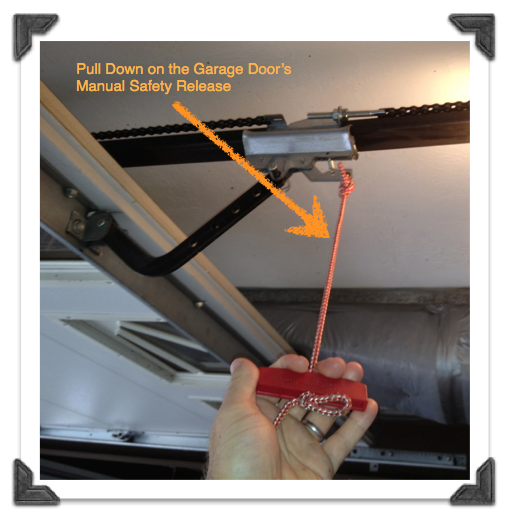
Keep a spare garage door remote in your car’s glove compartment. Know your garage door’s manual release location—the red cord hangs from the opener track. Consider installing a second keypad on the opposite side of the garage as backup, especially for larger properties. For wireless models, keep spare batteries stored with your emergency supplies.
Power Outage Protocol: Stay Prepared
Keypads operate on battery backup, but the garage door opener needs electricity. During outages, use the manual release cord to operate the door manually. Consider a battery backup system for your opener—available for most major brands. Test your manual operation procedure quarterly to ensure you can access your garage during emergencies.
Your garage door keypad should serve you reliably for years with proper programming and maintenance. The convenience of keyless entry becomes second nature—soon you’ll wonder how you ever managed without it. Test your system monthly, keep fresh batteries on hand, and enjoy the freedom of secure, remote-free garage access. With these straightforward techniques, you’ve transformed from keypad novice to confident user—no more fumbling for keys in the rain.