How to Choose a Gaming Keyboard: Top Tips
Your fingers dance across WASD in a high-stakes ranked match. One missed key press costs the round. That’s when you realize your $20 office keyboard isn’t cutting it. Choosing the right gaming keyboard transforms muscle memory into victories, but with hundreds of models flooding the market, the decision feels overwhelming. This guide cuts through the marketing noise to reveal exactly what separates tournament-grade keyboards from RGB-lit disappointments. You’ll discover which size fits your playstyle, why switch type determines your rank ceiling, and how to future-proof your purchase without emptying your wallet.
Pinpoint Your Exact Layout Needs
Why TKL Dominates Competitive Setups
TKL keyboards eliminate the numpad while keeping your F-row and arrow keys intact, saving 4 inches of precious desk space. This strategic real estate shift lets you position your mouse closer to your body, dramatically improving aim stability in FPS titles like CS2 or Valorant. Professional Counter-Strike players consistently choose TKL for its perfect balance between macro functionality and mouse maneuverability.
When full-size makes sense: Only if you regularly play MMOs requiring 20+ ability hotkeys or stream while managing chat macros. For 95% of gamers, the numpad becomes dead weight that forces awkward mouse positioning during critical gameplay moments.
60% Layouts: The Competitive Edge You Need
60% keyboards deliver the ultimate competitive advantage by removing all non-essential keys. Their compact frame creates maximum mouse space—critical when playing at low DPI settings where every millimeter counts. Top-tier Apex Legends pros swear by them for eliminating accidental key presses during high-stress rotations.
Critical limitation: Arrow keys and F-row require layer switching. If you play strategy games or MMOs needing constant access to these keys, the 75% layout offers the sweet spot—retaining arrows and navigation cluster while still saving significant desk space compared to TKL.
Select Switches That Match Your Game Genre

Linear Switches for Rapid-Fire Dominance
Linear switches like ROG NX Snow or Gateron Reds deliver pure speed with zero tactile feedback. Each keystroke glides smoothly from top to bottom, enabling lightning-fast double-taps essential for strafing in Valorant or bunny-hopping in Apex Legends. These switches prevent finger fatigue during marathon sessions, keeping your reaction times sharp when it matters most.
Pro tip: Competitive FPS players should prioritize linear switches with 1.8mm actuation points. Anything higher creates unnecessary travel time between presses. The SteelSeries Apex Pro Mini’s magnetic switches take this further with 0.1mm actuation adjustment—fine-tune your triggers to match specific game mechanics.
Tactile Switches for Ability Confirmation
Tactile switches like Gateron Browns provide physical feedback precisely at the actuation point. This subtle bump confirms your Shadowbolt cast actually triggered in World of Warcraft, even when your eyes track complex raid mechanics. MMO and MOBA players benefit from this tactile confirmation during ability rotations.
Avoid clicky switches like Kailh Box Whites for competitive play—the audible click distracts teammates during voice comms and creates unnecessary finger resistance. Reserve these for solo RPG sessions where audio feedback enhances immersion.
Demand Tournament-Grade Connectivity
Why 2.4GHz Wireless Beats Wired for Most Gamers
Modern 2.4GHz wireless keyboards like the ROG Strix Scope II 96 deliver true 1ms latency—indistinguishable from wired performance for 99% of players. With battery life stretching to 1,500 hours (lights off), they eliminate cable drag without sacrificing responsiveness. The Cooler Master MK770 proves budget wireless can match premium performance with its reliable tri-mode connectivity.
Critical check: Ensure your wireless keyboard includes onboard dongle storage. Nothing ruins tournament readiness like a missing USB receiver. Models like the Lemokey L3 cleverly hide the dongle inside the keyboard’s feet.
Bluetooth’s Hidden Pitfall for Ranked Play
While Bluetooth extends battery life dramatically (up to 600 hours on the Logitech G515), its 8ms latency creates noticeable input lag in competitive scenarios. Reserve Bluetooth for casual gaming sessions—never use it for ranked matches where milliseconds determine victory. The SteelSeries Apex Pro Mini’s dual wireless modes let you switch seamlessly between low-latency 2.4GHz and battery-saving Bluetooth.
Build Quality That Survives Your Longest Grind
Aluminum Plates vs Plastic: The Stability Test
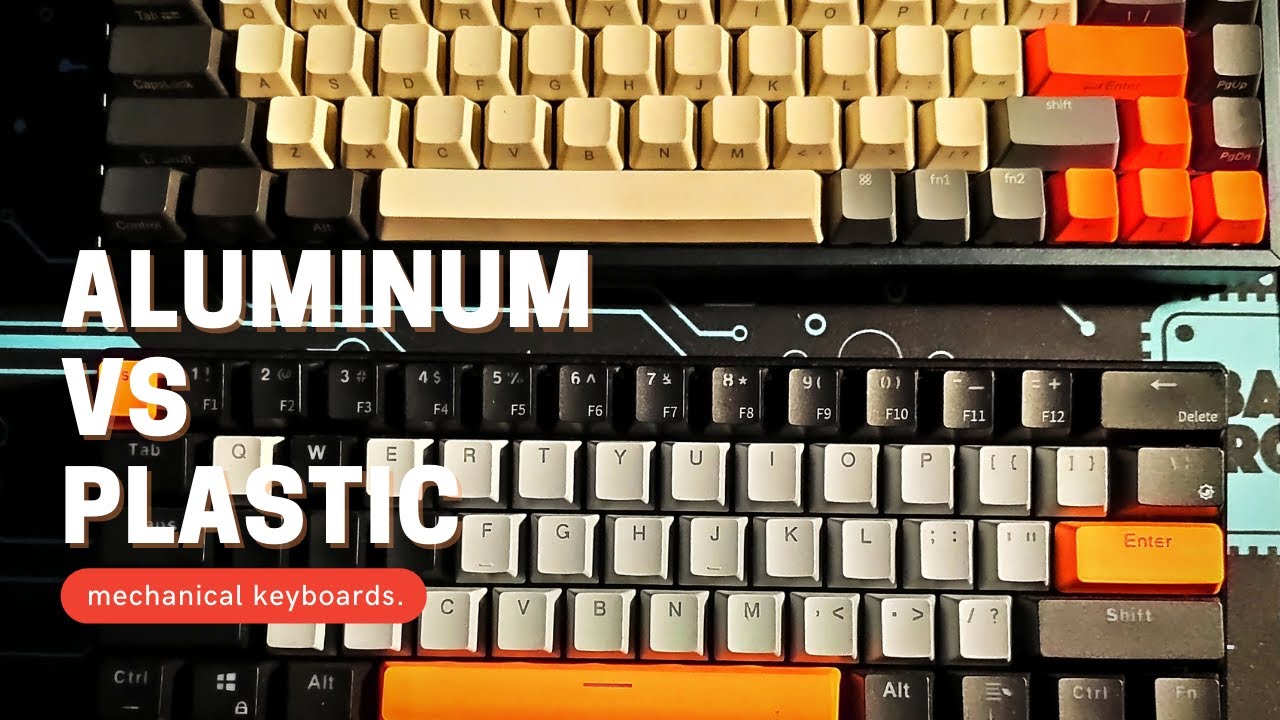
CNC aluminum top plates like those in the Lemokey L3 (4.36 lbs) provide rock-solid stability during intense gaming sessions. When spamming abilities in WoW raids, the keyboard stays planted while cheaper plastic models slide across your desk. This stability translates directly to more consistent keypress accuracy during clutch moments.
Visual cue: Lift potential keyboards before buying. Anything under 2 lbs lacks the heft needed for aggressive gaming. The Polar 75 Pro’s 2.72 lbs strikes the ideal balance between travel-friendliness and desk stability.
PBT Keycaps: The Longevity Essential
Double-shot PBT keycaps resist shine for 5-7 years of heavy use, maintaining optimal grip during sweaty ranked matches. ABS keycaps—common on Razer and Logitech models—develop slippery, greasy surfaces within 2 years. When testing keyboards, examine the spacebar and WASD keys for early shine patterns indicating poor material quality.
Pro maintenance tip: Carry a keycap puller in your gaming bag. Cleaning debris from under keycaps every 3 months prevents sticky keys and extends switch lifespan.
Software That Makes Compact Keyboards Viable
Why QMK/VIA Saves 60% Layout Players
60% keyboards require extensive remapping without dedicated arrow keys or F-row. Open-source QMK/VIA firmware (available on Lemokey L3 and Polar 75 Pro) offers unlimited customization without cloud dependency. Create reliable layer systems where holding Fn transforms WASD into arrow keys—critical for tournament play where internet connectivity fails.
Avoid cloud-dependent software like Razer Synapse for competitive setups. At LAN events, these platforms often fail without internet access, leaving you stuck with factory key mappings. The Asus ROG Strix Scope II 96’s offline-capable Armoury Crate proves more reliable despite its interface bloat.
Budget Smart Without Sacrificing Performance
$120: The Feature-Packed Sweet Spot
The Cooler Master MK770 at $119 delivers everything competitive gamers need: hot-swap sockets, gasket mounting, PBT keycaps, and tri-mode wireless connectivity. Its Kailh Box switches match premium models costing twice as much, while the 96% layout provides essential navigation keys without desk space waste.
What you sacrifice: Cramped navigation cluster compared to TKL models. But for FPS players who rarely use these keys, this tradeoff creates the ultimate compact battle station.
$230: The Competitive Goldilocks Zone
The Lemokey L3 ($214) represents the ideal investment for serious gamers. Its aluminum construction, Gateron Jupiter switches, and open-source QMK support deliver tournament-ready performance with zero compromises. The integrated knob provides instant volume control during streamer emergencies without breaking focus.
Hidden value: Aluminum construction isn’t just for show—it dampens sound during late-night sessions, preventing keyboard noise from bleeding into your microphone during streams.
Make Your Final Decision in 60 Seconds
Choose TKL if: You play competitive FPS but still need F-row shortcuts for game-specific macros. Models like the Lemokey L3 deliver perfect balance.
Choose hot-swap if: You want to experiment with switch types without buying new keyboards—essential for finding your perfect tactile profile.
Avoid Bluetooth for ranked play: Its 8ms latency creates noticeable input lag in competitive scenarios. Stick with 2.4GHz wireless or wired connections.
Prioritize PBT keycaps: They maintain grip through sweaty ranked matches and last 3x longer than slippery ABS alternatives.
Your gaming keyboard directly impacts performance more than any peripheral except your mouse. Choose layout based on your primary games, switches based on your playstyle, and connectivity based on your competitive level. The right keyboard won’t make you a pro overnight, but the wrong one guarantees you’ll never reach your potential. Invest in proper maintenance—clean keycaps quarterly and update firmware regularly—to keep your advantage sharp through every season. When your next clutch play hinges on a single keypress, you’ll be glad you learned how to choose a keyboard for gaming wisely.