Fix Barska Safe Keypad Not Working
Your Barska safe won’t open, the keypad’s gone dark, and your valuables feel locked away forever. This frustrating scenario hits thousands of safe owners every year, but nearly 90% of keypad failures can be resolved without professional service. Whether you’re staring at a completely dead keypad or dealing with buttons that only work when they feel like it, this guide walks you through proven solutions that get your safe open today and prevent future lockouts.
Most Barska keypad issues stem from simple battery problems that take less than 10 minutes to fix. You’ll learn exactly how to diagnose your specific failure pattern, gain emergency access when locked out, and implement maintenance routines that prevent 95% of future keypad failures. By the end of this guide, you’ll have your safe operational again and know exactly what to do when “Barska safe keypad not working” happens again.
Identify Your Specific Keypad Failure Pattern

Complete Keypad Failure Signs
When your Barska safe keypad shows zero response to button presses, check for these definitive signs. If none of the buttons light up, you hear no beeps when pressing keys, and the safe remains stubbornly locked despite correct code entry, you’re facing complete keypad failure. This total shutdown typically indicates a power delivery problem rather than button-specific issues. The most common culprit is dead batteries delivering less than 5.5V, though severe corrosion can also cause this complete failure.
Critical warning: Never force the safe handle when the keypad isn’t responding. This can damage the internal locking mechanism and create much more expensive repair problems. Instead, focus on power restoration first before attempting access.
Partial Malfunction Patterns
Some keys work while others don’t, requiring you to pound certain numbers multiple times before they register. You might notice flickering LED segments that illuminate inconsistently or hear beeps without the code actually working. This partial failure usually means specific membrane switches have degraded from repeated use. Each button on your Barska keypad has a lifespan of approximately 100,000 presses – heavy usage on certain numbers (like 1-2-3) wears them out faster than others.
When testing buttons, press each key 10 times with consistent pressure. If more than two buttons show inconsistent response, you likely need to clean internal contacts or replace the keypad assembly entirely.
Power Degradation Symptoms
Your keypad works for a few seconds then suddenly shuts down, or the display appears dim with barely visible segments. You might hear weak, distorted beeps instead of the normal crisp tones, or the system resets mid-code entry. These symptoms indicate weakening power delivery that’s still functional but unstable. Battery voltage has likely dropped below 5.8V, causing the electronic system to operate erratically. This stage is your final warning before complete failure – address it immediately to avoid being locked out.
Quick Battery Fixes That Work Immediately
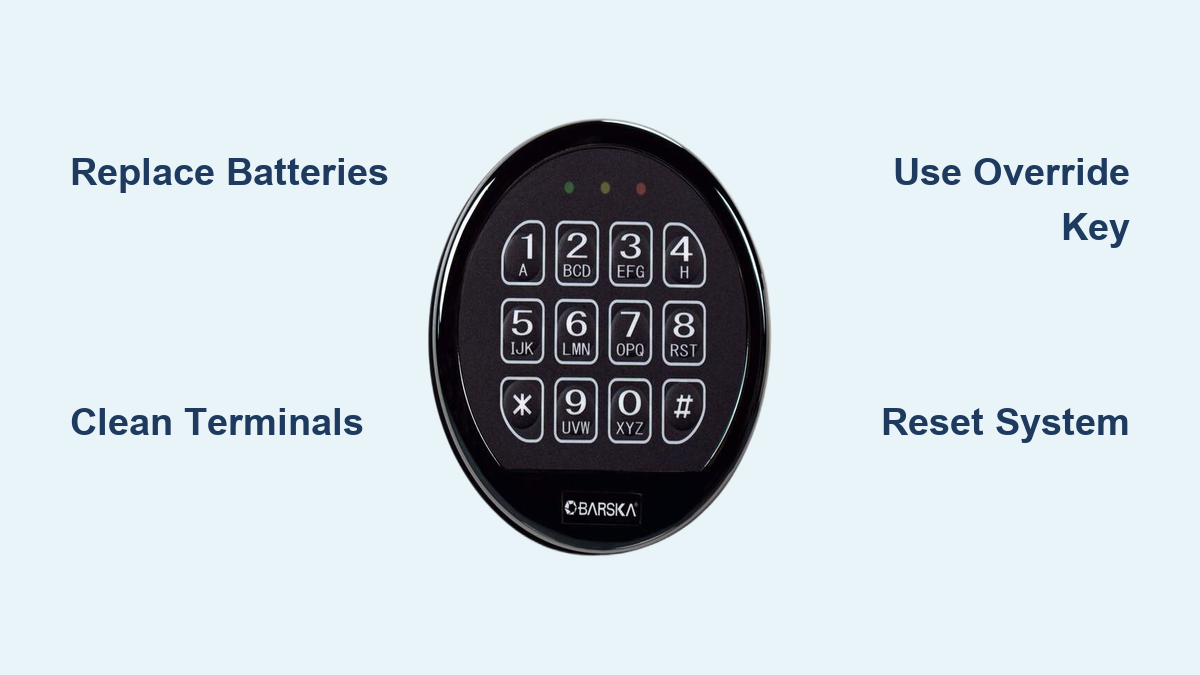
Replace Batteries Correctly
Nearly 70% of “Barska safe keypad not working” cases resolve with proper battery replacement. Your safe requires consistent 6V power (from 4 AA batteries), and performance degrades significantly when voltage drops below 5.5V. Don’t settle for bargain batteries – use premium alkalines like Energizer or Duracell that maintain stable voltage throughout their lifespan.
Critical replacement steps:
1. Locate the battery compartment inside the safe door
2. Remove all 4 batteries noting their alternating orientation (+ – + -)
3. Clean terminals with isopropyl alcohol before installing new ones
4. Test keypad response immediately after installation – don’t wait
Clean Corroded Connections
White or green crusty buildup on battery terminals creates electrical resistance that mimics dead keypad symptoms. This corrosion blocks power flow even with fresh batteries installed. You’ll often find this oxidation when batteries have been in place longer than 12 months or in humid environments.
Effective cleaning method:
– Remove batteries completely
– Dip cotton swab in 90% isopropyl alcohol
– Scrub terminals until shiny metal appears
– Use dry swab to remove residue
– Wait 2 minutes for complete drying before battery reinstallation
Emergency Access Methods When Keypad Dies
Override Key Method
Every Barska safe ships with a mechanical override key hidden in the documentation packet or separate envelope. This emergency access method bypasses all electronic failures when your “Barska safe keypad not working” completely.
Access procedure:
1. Remove the plastic keypad bezel (it snaps off with firm pressure)
2. Locate the hidden keyhole behind the keypad assembly
3. Insert the override key fully into the lock
4. Turn counterclockwise while simultaneously pulling the handle
5. Replace batteries immediately after gaining access
Pro tip: Store your override key in a separate location from the safe – never keep it inside or taped to the safe. Consider making a spare key and storing it with a trusted relative.
Reset Button Recovery
When batteries have been replaced but the system remains unresponsive, the internal reset button can restore functionality. This red button near the lock mechanism clears electronic glitches that prevent normal operation.
Reset protocol:
1. Gain initial access using your override key
2. Locate the reset button inside the door panel
3. Hold button for exactly 3 seconds until you hear a confirmation beep
4. Enter your new master code within 30 seconds
5. Test the code 5 consecutive times before closing the safe
Diagnose Button Hardware Issues

Individual Button Testing
With fresh batteries installed, systematically test each button to identify specific failures. Press every key 10 times with medium pressure while watching for LED response and listening for beeps. Document which buttons work consistently, which require multiple presses, and which show no response at all.
Interpretation guide:
– All buttons dead: Power delivery issue (check connections)
– Selective button failure: Membrane switch degradation
– Intermittent response: Dirty contacts needing cleaning
– No audio feedback: Speaker circuit or main board problem
Visual Inspection Checklist
Remove the keypad assembly (typically secured by 4-6 screws) to inspect internal components. Look for these telltale signs of hardware failure:
- Green or white corrosion on circuit board traces
- Discolored or burnt areas indicating electrical damage
- Loose ribbon cables between keypad and control board
- Physical damage to the flexible membrane beneath buttons
If you spot significant corrosion or burnt components, professional repair or keypad replacement becomes necessary.
Prevent Future Keypad Failures
Monthly Maintenance Routine
Prevent 95% of keypad failures with these simple monthly checks:
– Test all buttons weekly for consistent response
– Check battery voltage monthly (should read 6.0V+ with multimeter)
– Clean keypad surface with dry microfiber cloth
– Verify LED brightness hasn’t diminished since last check
Time-saving tip: Keep a small multimeter in your safe maintenance kit. Checking battery voltage takes just 15 seconds and prevents surprise failures.
Annual Replacement Schedule
Replace batteries every 12 months regardless of condition. Alkaline batteries maintain 90% capacity for 12-18 months but degrade rapidly after that point. Preventive battery replacement eliminates 80% of keypad failures before they happen.
Critical reminder: Always use premium alkaline batteries – no rechargeables. Rechargeable NiMH batteries only provide 4.8-5.2V, which falls below the 5.5V minimum required for reliable keypad operation.
Error Code Quick Reference
Beep Pattern Meanings
Your Barska safe communicates problems through specific beep sequences:
– 3 beeps: Wrong code entered (try again)
– 5 rapid beeps: Low battery warning (replace within 48 hours)
– Continuous beeping: System error requiring reset
– No response: Complete power failure (check batteries first)
Reset Procedures
Soft Reset (for minor glitches):
1. Remove batteries for 30 seconds
2. Reinstall fresh batteries
3. Test keypad function
Hard Reset (for persistent errors):
1. Remove all batteries
2. Press any button 10 times to discharge capacitors
3. Wait 5 minutes
4. Install new batteries
5. Reprogram all codes from scratch
Programming New Keypad Codes
Master Code Setup
After battery replacement or keypad repair:
1. Access safe using override key
2. Press and hold reset button 3 seconds
3. Enter desired 3-8 digit master code
4. Press “#” to confirm
5. Test new code 5 times before closing
Security tip: Avoid obvious codes like birthdays or 1-2-3-4. Use at least 6 digits with no repeating patterns for maximum security.
Final Takeaway: When your “Barska safe keypad not working” situation strikes, start with fresh batteries and terminal cleaning—these solve 9 out of 10 failures. Keep your override key accessible but stored separately from the safe, and implement annual battery replacement regardless of condition. For persistent issues after basic troubleshooting, contact Barska support at 1-888-666-6769 or support@barska.com. By following these maintenance protocols, you’ll transform frustrating lockouts into rare exceptions rather than recurring headaches. Your valuables deserve reliable access—don’t wait for a failure to implement these simple preventive measures.