
What is Layer 4 Networking?
Picture this: you’re video calling your family across the globe, streaming your favorite show, and downloading a file—all simultaneously. Behind this seamless digital experience lies Layer4, the unsung hero orchestrating every byte of data flowing through your network. When Layer4 functions perfectly, you never notice it exists. But when it fails, everything grinds to a halt.
This guide dives deep into the transport layer, revealing how it powers your daily internet experience and what happens when things go wrong. You’ll learn to diagnose connection issues, optimize performance, and understand the protocols that make modern networking possible. Whether you’re troubleshooting slow connections or designing high-performance applications, mastering Layer4 transforms how you interact with network technology.
Layer4 Core Functions That Keep Your Data Flowing
Layer4 sits at the heart of network communications, transforming raw network packets into meaningful data your applications can use. Think of it as a skilled postal worker who not only delivers your mail but ensures every letter arrives in order, intact, and to the correct recipient.
How Layer4 Breaks Down and Rebuilds Your Data
Every email, video frame, or file you transmit gets broken into manageable pieces called segments. Your favorite 4K movie doesn’t travel as one massive chunk—it splits into thousands of smaller segments, each wrapped with delivery instructions. At the destination, Layer4 acts like a master puzzle solver, reassembling these fragments into the original content.
Critical segmentation factors include:
– Maximum Segment Size (MSS): Each segment’s data payload limit
– Path MTU discovery: Finding the largest segment size your network can handle
– Fragmentation avoidance: Preventing performance-killing IP fragmentation
Without proper Layer4 segmentation, your large files would overwhelm network equipment or arrive corrupted. When troubleshooting slow transfers, checking MSS configuration should be your first step.
The Hidden Life Cycle of Network Connections
Unlike lower layers that simply forward packets, Layer4 maintains relationships between communicating applications. These connections have distinct lifecycles: birth (establishment), life (data exchange), and death (termination). TCP tracks every connection’s state, from initial handshake to graceful closure.
Watch for these critical connection states:
– SYN-SENT: Client initiating connection (if stuck here, server isn’t responding)
– ESTABLISHED: Active data exchange (the healthy state you want)
– TIME-WAIT: Ensuring last ACK reaches destination (normal but can accumulate)
When connections get stuck in intermediate states like SYN-RECEIVED or CLOSE-WAIT, your applications will experience timeouts and failures. Use netstat -tuln to check connection states when diagnosing network issues.
TCP vs UDP: Choosing the Right Layer4 Protocol for Your Needs
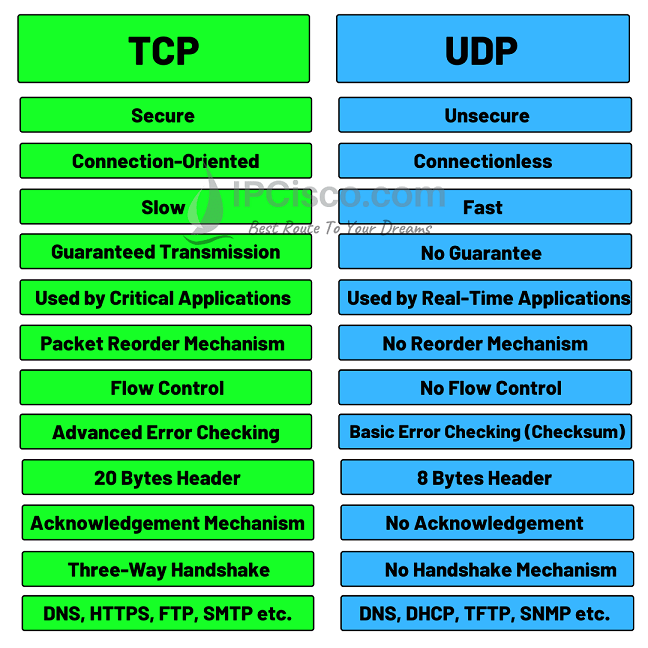
Selecting between TCP and UDP determines your application’s entire networking personality. This decision impacts everything from user experience to infrastructure costs.
When You Must Use TCP for Reliable Delivery
TCP excels when reliability trumps speed. Your banking app, email client, and file transfer tools depend on TCP’s guarantees. The protocol ensures every byte arrives correctly, even if that means waiting for retransmissions.
TCP’s reliability toolkit includes:
– Sequence numbers: Every byte gets a position marker
– Acknowledgments: Receiver confirms successful delivery
– Retransmission timers: Automatic retry for lost segments
– Checksum verification: Detecting corrupted data
If your application can’t tolerate data loss—even at the cost of some latency—TCP is your only choice. File transfers, database communications, and web browsing all require TCP’s ironclad delivery guarantees.
When UDP’s Speed Wins Over Reliability
UDP strips away reliability overhead for maximum velocity. Your Zoom call, online gaming session, and live sports stream use UDP because a delayed video frame is worthless—even if perfect. The protocol sends data and hopes for the best.
UDP’s performance advantages:
– No connection setup: Instant data transmission
– No acknowledgments: Reduced latency
– No flow control: Maximum throughput
– 8-byte header: Minimal processing overhead
When building real-time applications where timely delivery matters more than perfect delivery, UDP gives you the speed you need. Just remember: your application must handle any errors or lost packets.
Layer4 Security Threats You Need to Watch For
The transport layer’s openness makes it both powerful and vulnerable. Attackers exploit protocol mechanics to disrupt services or gain unauthorized access.
How Hackers Exploit TCP Connections
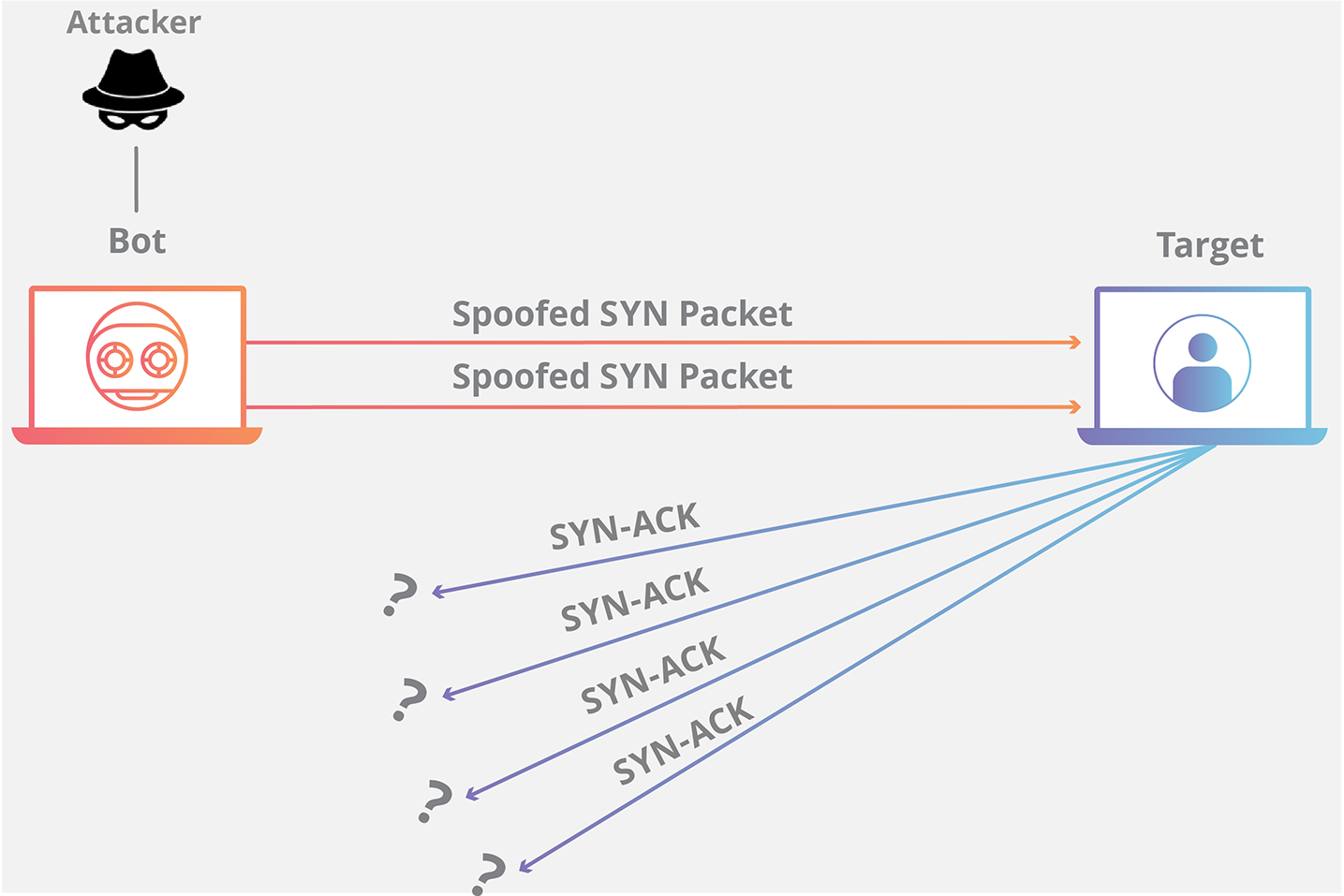
SYN Flood Attacks
Attackers overwhelm servers with connection requests that never complete. Each half-open connection consumes resources until legitimate users can’t connect. Modern defenses include SYN cookies and connection rate limiting—essential protections for any public-facing service.
RST Injection
Forged reset packets can terminate legitimate connections abruptly. This attack targets specific users rather than entire services. If your secure connections mysteriously drop, check for RST injection attempts using packet analysis tools.
Why UDP Services Are Prime Attack Targets
UDP’s connectionless nature creates unique vulnerabilities. Without connection state, servers can’t easily distinguish legitimate traffic from attacks.
UDP Flood Attacks
Massive volumes of UDP packets overwhelm bandwidth and processing capacity. DNS and NTP services often amplify these attacks through response reflection. If your network suddenly slows to a crawl, check for unusual UDP traffic patterns using netstat -us.
Service Exploitation
Open UDP services become attack vectors. Unsecured DNS resolvers enable DDoS amplification, while vulnerable SNMP implementations leak sensitive information. Always secure or disable unnecessary UDP services.
Layer4 Performance Optimization Techniques That Actually Work
Optimizing Layer4 performance requires understanding your specific use case and network conditions. These strategies dramatically improve throughput and reduce latency.
TCP Tuning Parameters for Maximum Throughput
Window Scaling
High-bandwidth networks need larger window sizes. TCP window scaling extends the 16-bit window field to 32 bits, enabling gigabit throughput over long distances. For networks with high latency (like satellite connections), proper window scaling is non-negotiable.
Selective Acknowledgment (SACK)
Instead of retransmitting all data after a loss, SACK identifies exactly which segments need retransmission. This dramatically improves performance on lossy networks like mobile connections. Enable SACK on all servers handling mobile traffic.
TCP_NODELAY
Disabling Nagle’s algorithm reduces latency for interactive applications. Your SSH sessions and online games benefit from immediate transmission of small packets. Set TCP_NODELAY for all real-time applications.
UDP Optimization for Time-Sensitive Applications
QoS Configuration
Prioritize UDP traffic for time-sensitive applications. Voice and video streams get expedited handling while bulk transfers wait their turn. Configure your routers to mark and prioritize VoIP and video traffic.
Buffer Management
Proper UDP buffer sizing prevents packet drops during traffic bursts. Too small causes drops, too large increases latency. Monitor netstat -su for packet drop statistics and adjust buffers accordingly.
Modern Layer4 Implementations Changing Network Architecture
Today’s networks push Layer4 beyond traditional boundaries. New protocols and architectures reshape how we think about transport layer services.
QUIC Protocol: The TCP Replacement You Need to Know
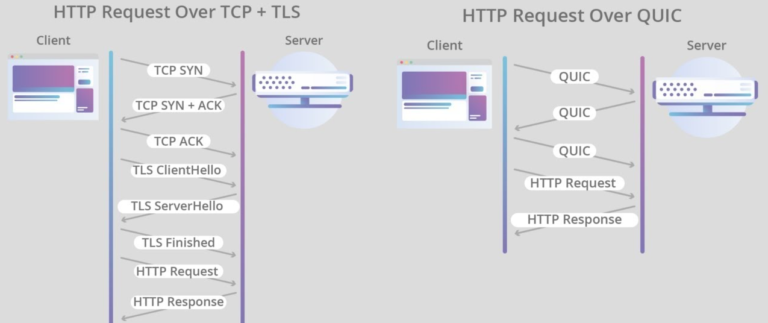
Google’s QUIC protocol reimagines transport layer security. Built on UDP, QUIC combines encryption and connection management into a single handshake, reducing latency significantly.
QUIC delivers these game-changing advantages:
– 0-RTT connection establishment: Repeat connections start immediately
– Connection migration: Seamless transition between WiFi and cellular
– Built-in encryption: TLS 1.3 integrated at transport layer
– Multiplexing without blocking: Independent streams prevent head-of-line blocking
HTTP/3 runs on QUIC, making it the future of web transport. If you manage web infrastructure, preparing for QUIC adoption should be on your roadmap.
Container Networking Demands New Layer4 Approaches
Microservices architectures create thousands of Layer4 connections between containers. Traditional load balancing struggles with this scale and dynamism.
Service mesh solutions solve container challenges:
– Envoy proxy: Manages Layer4 connections between services
– Circuit breaking: Preventing cascade failures
– Traffic routing: Blue-green deployments and canary releases
When deploying containerized applications, invest in service mesh technology to manage the explosion of Layer4 connections between microservices.
Layer4 Troubleshooting: Diagnose Issues in Minutes
Systematic diagnosis reveals whether problems stem from Layer4 or other network layers. These techniques quickly isolate root causes.
Connection Failure Analysis Workflow
Three-Way Handshake Debugging
Use packet capture to trace connection establishment. Missing SYN-ACK responses indicate server issues, while RST packets suggest port filtering or service unavailability. A single tcpdump command can reveal where your connections are failing.
Window Size Investigation
Zero window advertisements cause mysterious slowdowns. Monitor window scaling negotiations and buffer availability at both endpoints. If window size drops to zero, your application isn’t processing data fast enough.
Essential Layer4 Diagnostic Commands
“`bash
netstat -tuln
ss -i
netstat -us
traceroute -T destination
“`
Save these commands in your troubleshooting toolkit—they’ll help you diagnose 80% of Layer4 issues.
Understanding Layer4 transforms you from a passive network user into an informed troubleshooter. Whether optimizing application performance or investigating connection issues, these transport layer insights prove invaluable. As networks evolve with QUIC and container architectures, mastering Layer4 fundamentals ensures you stay ahead of the curve.
Remember: every successful video call, fast file transfer, and smooth streaming session relies on the invisible but critical services provided by Layer4. When problems arise, systematic diagnosis using these techniques quickly restores optimal performance. Start applying these Layer4 insights today to build more reliable, faster, and secure network applications.